
Overview
The Exponam.Connect Excel Add-in for Mac and browser-based Excel provides access to Delta Lake data directly in your spreadsheet. This guide covers installation and usage for both the macOS desktop version of Excel and browser-based Excel (Excel for the Web).
⚠ The Mac and browser editions support Delta Sharing data access only. Analyst Intelligence features (SQL queries, natural language queries) and ML Model Serving are available exclusively on Windows. For the full feature set, see the Windows Usage Guide.
Both the Mac and browser editions use a companion application (ExponamConnect Utility) that runs in the background and mediates features not available within the Office Web Add-in model. The companion utility must be running for the add-in to function.
Feature Comparison
|
Feature |
Windows |
Mac |
Browser |
|
Delta Sharing data access |
✓ |
✓ |
✓ |
|
SQL & natural language queries |
✓ |
— |
— |
|
ML Model Serving |
✓ |
— |
— |
|
Live table updates |
✓ |
— |
— |
|
Quick Import (right-click) |
✓ |
— |
— |
|
PivotTable on import |
✓ |
— |
— |
|
Performance (1.1M rows) |
12 seconds |
~4 minutes |
~12 minutes |
Power users who routinely work with large datasets are encouraged to use the Windows edition for significantly faster import speeds.
Part 1: Mac (Desktop Excel)
System Requirements — Mac
- macOS 10.15 (Catalina) or later
- Microsoft Excel for Mac (Microsoft 365 or Office 2019+)
- Internet connection
- A Delta Sharing credential file (.share) provided by your data administrator
Download and Install — Mac
The Mac edition requires two components: the ExponamConnect companion application (installed on your Mac) and the Excel Add-in (activated within Excel). The companion application must be running for the add-in to function.
Install the Companion Application
- Download the installer. From your Mac, download the .dmg file:
http://files.exponam.com/installers/exponamconnectdmg/ExponamConnect.dmg
- Install the application. Open the .dmg file and drag the Exponam icon onto the Applications folder icon.
[Screenshot: macOS .dmg installer — drag to Applications]
- Launch ExponamConnect. Open Finder, navigate to Applications, and launch ExponamConnect. Follow the first-time setup screens that appear.
[Screenshot: ExponamConnect companion application — first launch]
- Add to Login Items. When prompted, add ExponamConnect to your Login Items so it starts automatically when you log in. You can do this by right-clicking the ExponamConnect icon in your Dock and selecting Options → Open at Login. The companion application uses minimal system resources when idle.
Activate the Excel Add-in
- Open Excel. Launch Microsoft Excel for Mac.
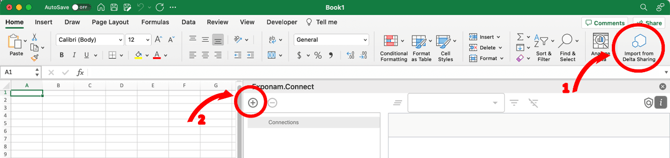
- Go to the Add-ins section of the ribbon and select Connect. This enables the “Import from Delta Sharing” tool on Excel’s Home tab.
[Screenshot: Excel for Mac — Add-ins ribbon with Exponam.Connect selected]
You will need to re-activate the add-in each time Excel is launched. If the Exponam.Connect option disappears after restarting Excel, reactivate it from Add-ins.
To review setup instructions at any time, click About Exponam.Connect in the companion application.
Configuration — Mac
Adding Delta Sharing Connections
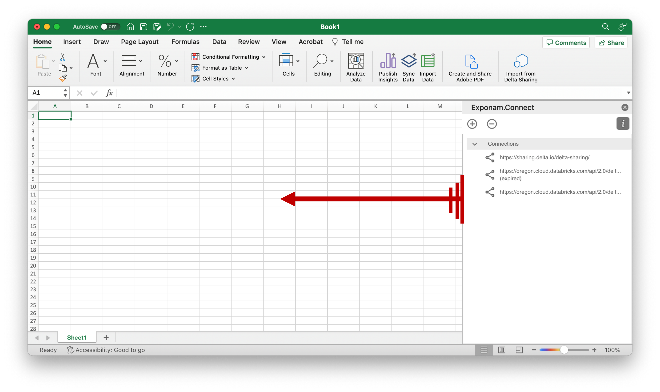
- Click Import from Delta Sharing on Excel’s Home tab to open the Exponam.Connect task pane. The pane opens as a narrow window on the right side of Excel. Drag the pane edge to expand it.
- Click the (+) button to add a share by selecting a .share credential file.
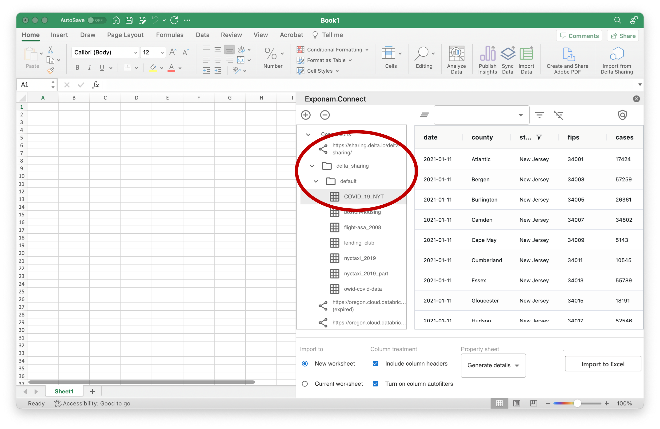
- Click the share name in the Connections pane to expand the navigation tree. Click a table to generate a data preview.
[Screenshot: Mac task pane — Connections and data preview]
Connection details are retained between sessions.
License Key
The add-in works in free mode with limited capacity. If your organization has a license key, apply it through the task pane settings. Contact info@exponam.com for license inquiries.
Authentication
The same authentication methods apply as on Windows. v1 share files include embedded bearer tokens; v2 share files use OIDC federation through your enterprise identity provider. See the Windows Usage Guide or the Exponam.Connect Okta Authentication guide for detailed authentication configuration.
Working with Data — Mac
Filtering and Column Selection
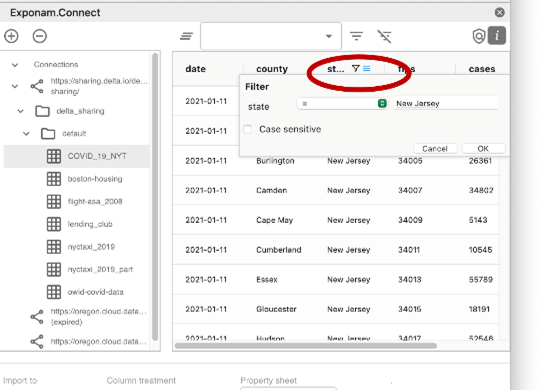
The task pane provides the same core data interaction as the Windows edition. You can create filters on columns, save filtered views, and select which columns to include in your import.
[Screenshot: Mac task pane — filter and column selection]
Importing to Excel
Once you are satisfied with your filters and column selection, click Import to Excel. Data is imported to the active worksheet.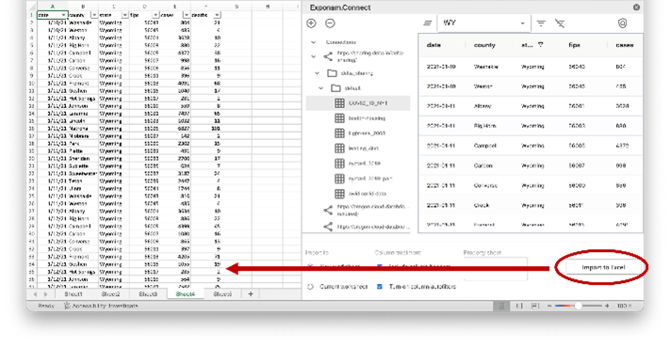
Saving Favorites
Save your current filter and column configuration for reuse by clicking the save/star icon. Saved views appear in the Connections pane for quick access.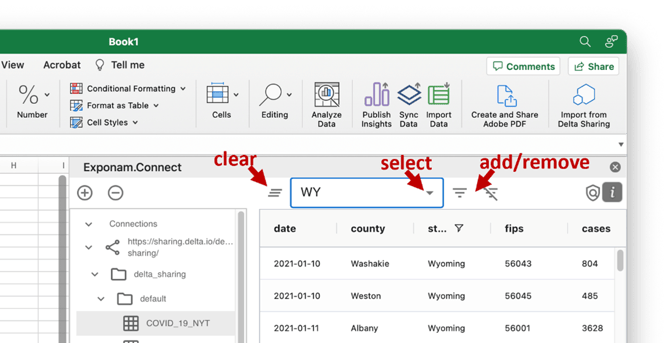
Live table updates, Quick Import, PivotTable creation, and Save to .BIG file are not available on Mac. Use the Windows edition for these features.
Part 2: Browser (Excel for the Web)
System Requirements — Browser
- A Windows PC or Mac
- A supported web browser: Chrome or Microsoft Edge
⚠ Safari is not supported. Other browsers may work but are not officially supported.
- A Microsoft 365 account with access to Excel for the Web
- Internet connection
- A Delta Sharing credential file (.share) provided by your data administrator
If you are on a Windows PC, it is strongly recommended to use the installed Windows version of Exponam.Connect Pro rather than the browser edition. The Windows Pro version is significantly faster, more powerful, and easier to install. It does not require the Utility application described below.
Install and Activate — Browser
Exponam.Connect for Web runs with a companion application, ExponamConnect Utility, which must be installed on your PC or Mac. The Utility runs in the background. If you attempt to use the Excel Add-in while the Utility is not running, you will receive a message to start it.
Step 1: Install the ExponamConnect Utility
- Download the Utility using the appropriate link for your machine:
Windows: ExponamConnectUtility.exe
Mac (with Chrome): ExponamConnectUtility.pkg
- Install and launch the Utility. After installation, start the ExponamConnect Utility application.
[Screenshot: ExponamConnect Utility — main window]
For easiest use, set the Utility application to autostart on your machine.
- Download the manifest file. In the Utility, click the Gear icon and click Download Manifest File. Save the file to a location on your computer that you can easily access.
[Screenshot: ExponamConnect Utility — Gear menu with Download Manifest File]
Step 2: Configure the Excel Add-in
- Open Excel for the Web in Chrome or Microsoft Edge.
- Click the Add-ins icon in the Home toolstrip.
- Click More Add-ins.
- Select My Add-ins, then Manage My Add-ins, then Upload My Add-in.
- Select the manifest file you saved from the Utility in Step 1. Exponam will now appear in the toolstrip.
[Screenshot: Excel for the Web — Add-ins → More Add-ins → Upload My Add-in flow]
[Screenshot: Excel for the Web — Exponam in toolstrip after manifest upload]
This configuration step may need to be repeated periodically if the “Exponam” item disappears from the toolstrip.
Configuration — Browser
Adding Delta Sharing Connections
Click Exponam in the toolstrip to open the task pane, then click the (+) button to add Delta Sharing connections by selecting your .share credential file(s). The task pane displays your shares, schemas, and tables in a navigation tree.
License Key
Apply your license key through the task pane settings. The add-in is free for limited use. Contact info@exponam.com for license inquiries.
Authentication
Same as Mac and Windows: v1 share files authenticate via embedded bearer token; v2 share files use OIDC federation. See the Windows Usage Guide for detailed authentication information.
Working with Data — Browser
Usage of Exponam.Connect for Web is identical to the Mac edition. The task pane interface provides the same data browsing, filtering, and import capabilities.
Filtering and Column Selection
Click column filter icons to create filters by data type (text, numeric, date). Use the column checkboxes to include or exclude columns from your import. Save frequently used filter configurations as favorites.
Importing to Excel
Click Import to Excel to bring filtered data into the active worksheet.
The browser edition has the same feature limitations as the Mac edition: no live updates, Quick Import, PivotTable creation, or .BIG file export. Import performance is comparable to the Mac edition.
Analyst Intelligence and Model Serving
The Analyst Intelligence features (SQL queries, natural language queries) and Databricks ML Model Serving are currently available on the Windows edition only. These features require the Windows VSTO add-in architecture for full compute integration.
Troubleshooting
Mac: The ExponamConnect companion application is not running
The Excel add-in requires the companion application to be running. Open Finder → Applications → ExponamConnect. If you added it to Login Items, it should start automatically on login. Verify by checking for the Exponam icon in your menu bar or Dock.
Mac: The Exponam.Connect option disappears after restarting Excel
This is expected behavior. You need to re-activate the add-in from the Add-ins ribbon each time Excel launches.
Browser: Safari is not working
Safari is not supported. Use Chrome or Microsoft Edge.
Browser: Exponam disappeared from the toolstrip
This can happen periodically. Re-upload the manifest file: click Add-ins in the Home toolstrip → More Add-ins → My Add-ins → Manage My Add-ins → Upload My Add-in, then select your saved manifest file.
Browser: “Start the Utility” message appears
The ExponamConnect Utility companion application must be running for the browser add-in to function. Launch it from your Applications (Mac) or Start menu (Windows). For uninterrupted use, set it to autostart on login.
No data appears in the preview
Verify your .share file is valid and that your Delta Sharing recipient has been granted access to the relevant shares. Click the refresh button to reload the preview. If the server does not support predicate hints, the preview may display a reduced dataset.
License key is not accepted
Ensure you are copying the full key with no extra spaces. If the issue persists, contact support@exponam.com.
Support
For questions, license requests, or technical assistance:
- Email: support@exponam.com
- Web: support.exponam.com
- License inquiries: info@exponam.com